We Shipped a Blank Page to Every AI Crawler
For about 250 days, our services page said "Loading services..." to every AI crawler that visited. Real customers saw the full page. ChatGPT, Claude, and Perplexity saw a header, a footer, and nothing in between. We found it while checking other people's sites. Here's what went wrong, how we fixed it, and how to check yours in thirty seconds.
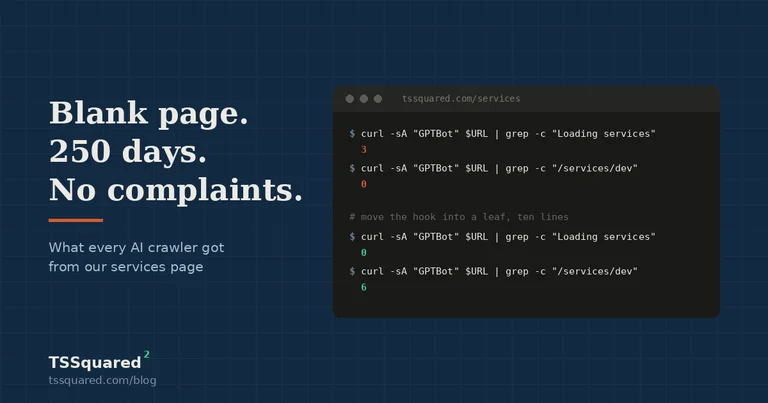
What the crawler saw
I was building a tool to test whether local business websites can be read by AI assistants. The test is simple. Fetch the page the way a crawler does, with no JavaScript, and look at what's in the HTML. Before pointing it at anyone else's site, I pointed it at ours.
$ curl -sA "GPTBot" https://tssquared.com/services | grep -c "Loading services"3$ curl -sA "GPTBot" https://tssquared.com/services | grep -c "/services/development/"0
Three loading messages. Zero links to any service. Twenty-one services in the catalog, priced and published, and a crawler could find none of them.
I ran it again with a different user agent in case something was filtering bots. Same result. I ran it against the homepage, which was fine, and the pricing page, which was fine. Only the services page, the one page whose whole job is to list what we do, was blank to anything that doesn't run JavaScript.
Google was fine the entire time. Googlebot runs JavaScript, waits for the page to fill in, and indexes what it sees. Search Console showed the page indexed, no errors, decent impressions. Every person who visited saw a full grid of cards with prices and delivery times. The only visitors who got the empty version were the ones that don't execute scripts, and in 2026 that list includes ChatGPT, Claude, Perplexity, and most of the other assistants people have started asking before they search.
Nobody complained. That's the part worth sitting with. A crawler doesn't file a support ticket. It reads what it can, decides you don't have much to say, and moves on to the shop that does.
Why it happened
The page was already server-rendered, which is what made this strange. When a request came in, the server fetched all twenty-one services from the database and wrote them into the response. I could see the data in the payload when I looked. It was there.
Then the client half of the page called useSearchParams() at the top level to read filter settings out of the URL, and that call was wrapped in a loading fallback. In Next.js, that hook at the root of a statically rendered page tells the framework it can't finish the render on the server. So the framework bails out, ships the fallback as the HTML, and lets the browser finish the job once JavaScript loads.
The browser did finish the job, every time, for every human. The crawlers never got past the fallback. The data was in the response and the rendered page threw it away.
The commit that did it landed on December 26, 2025. The message said "Skeleton loading state during hydration." It was a small, reasonable change. It was reviewed. The tests passed, because the tests checked the page after JavaScript ran, which is the only version anyone had thought to check. It merged, deployed, and sat there until September.
If you want the plumbing version: the water was in the pipe. The tap was installed on the wrong side of the wall. Anyone with the right key could open the wall and get water. Anyone without it saw a wall.
The fix
Ten lines. Move the URL-reading hook out of the page root and into a small leaf component that does nothing except read the URL after the page mounts and apply any filters it finds. The grid renders on the server with all twenty-one cards. The filters still work. The page stays static and cached, which is what we wanted in December and never actually had.
$ curl -sA "GPTBot" https://tssquared.com/services | grep -c "Loading services"0$ curl -sA "GPTBot" https://tssquared.com/services | grep -c "/services/development/"6
Then we wrote the test that should have existed all along. Render the page with no JavaScript, read the HTML, assert the service cards are in it. If anyone puts that hook back at the root, the build fails and tells them why.
That test took longer to write than the fix. That's usually how it goes. The fix is the easy part once you know where to look. The part that matters is making sure you never have to look there again.
What it cost us
I don't know, and I'd rather say that than invent a number.
We can't see what ChatGPT would have told someone who asked it for a custom software shop near Wichita in March. We can't count the recommendations that went to someone else. What we can do is run the same test on other local businesses and publish what we find, which is the next post. The early runs suggest we had company.
How to check your own site
You don't need our tool for this, though it exists, it's free, and it's at tssquared.com/tools/ai-visibility. Pick a page that matters to your business, the one that lists your services or your menu or what you sell, and run this from any terminal:
curl -sA "GPTBot" https://yoursite.com/your-page | grep -o "<h[1-3][^>]*>[^<]*" | head
If you see your headings and your product names, an AI assistant can read the page. If you see "Loading," "Please wait," a spinner label, or nothing at all, it can't.
If a terminal isn't your thing, there's a slower way that tells you the same thing. Open the page in Chrome. Open settings, find JavaScript under site permissions, and turn it off. Reload the page. Whatever is left on the screen is what a crawler gets. Turn JavaScript back on when you're done.
Some patterns we've seen fail this test, so you know what you're looking at:
Sites built on drag-and-drop builders that load their content through scripts after the page opens. Sites built by agencies on React or Vue without server rendering, where the HTML is an empty shell and everything arrives later. Sites that were server-rendered once and then had a "loading state" or a URL-parameter feature added on top, which is exactly what happened to us. Sites behind a bot-blocking service that returns a challenge page to anything it doesn't recognize.
And some that usually pass: plain HTML, WordPress with a normal theme, Squarespace and Wix for most page types, and any framework where the developer set up server rendering on purpose and checked it.
If yours fails, the fix depends on which case you're in. Sometimes it's a setting. Sometimes it's a rebuild of one page. Sometimes it's the whole site. A decent developer can tell you which in an hour, and you should expect them to show you the before and after with the same command I used above, not just tell you it's done.
What we changed in how we work
Every launch checklist we run now has one more line on it. Fetch the page as GPTBot, confirm the content is in the HTML. It takes ten seconds. It would have caught this on December 26.
We also stopped trusting "the tests pass" as the last word on a page. A test suite can pin a bug in place as carefully as it pins a feature. Ours did. The suite that checked the services page was written after the loading state went in, so it expected the loading state, and it passed for eight months while confirming the exact behavior we didn't want. That's its own post.
And we made the check public, which is the part I went back and forth on. The check that found this on our site is now on our site, and it will run against any URL you give it. No email, no signup. If it turns something up, it'll tell you what and roughly what it costs to fix, and you can take that to any developer you like. If you bring it to us, fine. If you don't, the check still did its job.
We're a two-person shop that builds websites for a living, and we shipped a page our own customers' customers couldn't read for most of a year. I'd rather tell you that myself than have you find it the way I did. It's the kind of thing you find when you point the flashlight at your own work first, and the kind of thing you only fix once if you write the test.
Measure twice. Code once. We measured once.
Services this covers
Website Development
Custom-built websites with modern frameworks, headless CMS, and mobile-first responsive design.
Prices as of September 2026
Get the next one by email. No newsletter yet; we'll write when there's something worth reading.